<?xml version="1.0" encoding="utf-8"?>
<feed xmlns="http://www.w3.org/2005/Atom">
    <id>https://docs.maintainerr.info/blog/</id>
    <title>Maintainerr Documentation Blog</title>
    <updated>2024-03-01T00:00:00.000Z</updated>
    <generator>https://github.com/jpmonette/feed</generator>
    <link rel="alternate" href="https://docs.maintainerr.info/blog/"/>
    <subtitle>Maintainerr Documentation Blog</subtitle>
    <icon>https://docs.maintainerr.info/img/favicon.ico</icon>
    <entry>
        <title type="html"><![CDATA[Getting Started (S01E01)]]></title>
        <id>https://docs.maintainerr.info/blog/getting-started-s01e01/</id>
        <link href="https://docs.maintainerr.info/blog/getting-started-s01e01/"/>
        <updated>2024-03-01T00:00:00.000Z</updated>
        <summary type="html"><![CDATA[Ok so you installed Maintainerr and don't know where to start.]]></summary>
        <content type="html"><![CDATA[<p><strong>Ok so you installed Maintainerr and don't know where to start.</strong></p>
<p>The rule system behind Maintainerr is quite complex, and therefore powerful. Getting started can be a little daunting at first. That is only because it is new to you. When you get the hang of it, you will be cleaning up that mess you call a library in no time. This is the first in a series of tutorials that should help you get more familiar with the rules and rule setup.</p>
<p><img decoding="async" loading="lazy" alt="Tutorial poster" src="https://docs.maintainerr.info/assets/images/movie_poster-a4eb4ca3a13e8d7f863574dc5947abd7.png" width="768" height="1344" class="img_ev3q"></p>
<p>Let's take the above movie as an example. This isn't a real movie, but for the purposes of this tutorial we are going to pretend. This movie has the following attributes across Plex, Overseerr, and Radarr:</p>
<p><strong>Plex</strong></p>
<table><thead><tr><th>Added</th><th>Last Viewed</th><th>Times Viewed</th><th>Audience Rating</th></tr></thead><tbody><tr><td>3Nov2023</td><td>10Jan2024</td><td>4</td><td>7.3</td></tr></tbody></table>
<p><strong>Overseerr</strong></p>
<table><thead><tr><th>Requested by</th><th>Requested Date</th><th>Times Requested by Anyone</th></tr></thead><tbody><tr><td>user_girl123</td><td>2Nov2023</td><td>4</td></tr></tbody></table>
<p><strong>Radarr</strong></p>
<table><thead><tr><th>Release Date</th><th>Is Monitored</th><th>Runtime</th></tr></thead><tbody><tr><td>31Oct2023</td><td>True</td><td>114 minutes</td></tr></tbody></table>
<div class="theme-admonition theme-admonition-tip admonition_xJq3 alert alert--success"><div class="admonitionHeading_Gvgb"><span class="admonitionIcon_Rf37"><svg viewBox="0 0 12 16"><path fill-rule="evenodd" d="M6.5 0C3.48 0 1 2.19 1 5c0 .92.55 2.25 1 3 1.34 2.25 1.78 2.78 2 4v1h5v-1c.22-1.22.66-1.75 2-4 .45-.75 1-2.08 1-3 0-2.81-2.48-5-5.5-5zm3.64 7.48c-.25.44-.47.8-.67 1.11-.86 1.41-1.25 2.06-1.45 3.23-.02.05-.02.11-.02.17H5c0-.06 0-.13-.02-.17-.2-1.17-.59-1.83-1.45-3.23-.2-.31-.42-.67-.67-1.11C2.44 6.78 2 5.65 2 5c0-2.2 2.02-4 4.5-4 1.22 0 2.36.42 3.22 1.19C10.55 2.94 11 3.94 11 5c0 .66-.44 1.78-.86 2.48zM4 14h5c-.23 1.14-1.3 2-2.5 2s-2.27-.86-2.5-2z"></path></svg></span>tip</div><div class="admonitionContent_BuS1"><p>This information can be looked at for an actual item in your Plex library. You can do it through the Plex UI or you can parse through the XML of an item.</p><p><a href="https://support.plex.tv/articles/201998867-investigate-media-information-and-formats/#:~:text=Open%20the%20Media,the%20XML%20information" target="_blank" rel="noopener noreferrer" class="">Link to see how to get your Plex media info and XML data</a></p></div></div>
<p>We want to make a rule that would add this movie to its collection.</p>
<div class="theme-admonition theme-admonition-note admonition_xJq3 alert alert--secondary"><div class="admonitionHeading_Gvgb"><span class="admonitionIcon_Rf37"><svg viewBox="0 0 14 16"><path fill-rule="evenodd" d="M6.3 5.69a.942.942 0 0 1-.28-.7c0-.28.09-.52.28-.7.19-.18.42-.28.7-.28.28 0 .52.09.7.28.18.19.28.42.28.7 0 .28-.09.52-.28.7a1 1 0 0 1-.7.3c-.28 0-.52-.11-.7-.3zM8 7.99c-.02-.25-.11-.48-.31-.69-.2-.19-.42-.3-.69-.31H6c-.27.02-.48.13-.69.31-.2.2-.3.44-.31.69h1v3c.02.27.11.5.31.69.2.2.42.31.69.31h1c.27 0 .48-.11.69-.31.2-.19.3-.42.31-.69H8V7.98v.01zM7 2.3c-3.14 0-5.7 2.54-5.7 5.68 0 3.14 2.56 5.7 5.7 5.7s5.7-2.55 5.7-5.7c0-3.15-2.56-5.69-5.7-5.69v.01zM7 .98c3.86 0 7 3.14 7 7s-3.14 7-7 7-7-3.12-7-7 3.14-7 7-7z"></path></svg></span>note</div><div class="admonitionContent_BuS1"><p>There are many more attributes available in the API responses of Plex, Sonarr/Radarr, and Overseerr. We are only looking at these specific ones for the tutorial.</p></div></div>
<p>Also, this won't be the only movie in the collection. However, all of the other movies that will be added into this collection matched the rule set for the same reasons.</p>
<hr>
<h2 class="anchor anchorTargetHideOnScrollNavbar_vjPI" id="rule-setup">Rule Setup<a href="https://docs.maintainerr.info/blog/getting-started-s01e01/#rule-setup" class="hash-link" aria-label="Direct link to Rule Setup" title="Direct link to Rule Setup" translate="no">​</a></h2>
<p>We will start from the top of a new rule.</p>
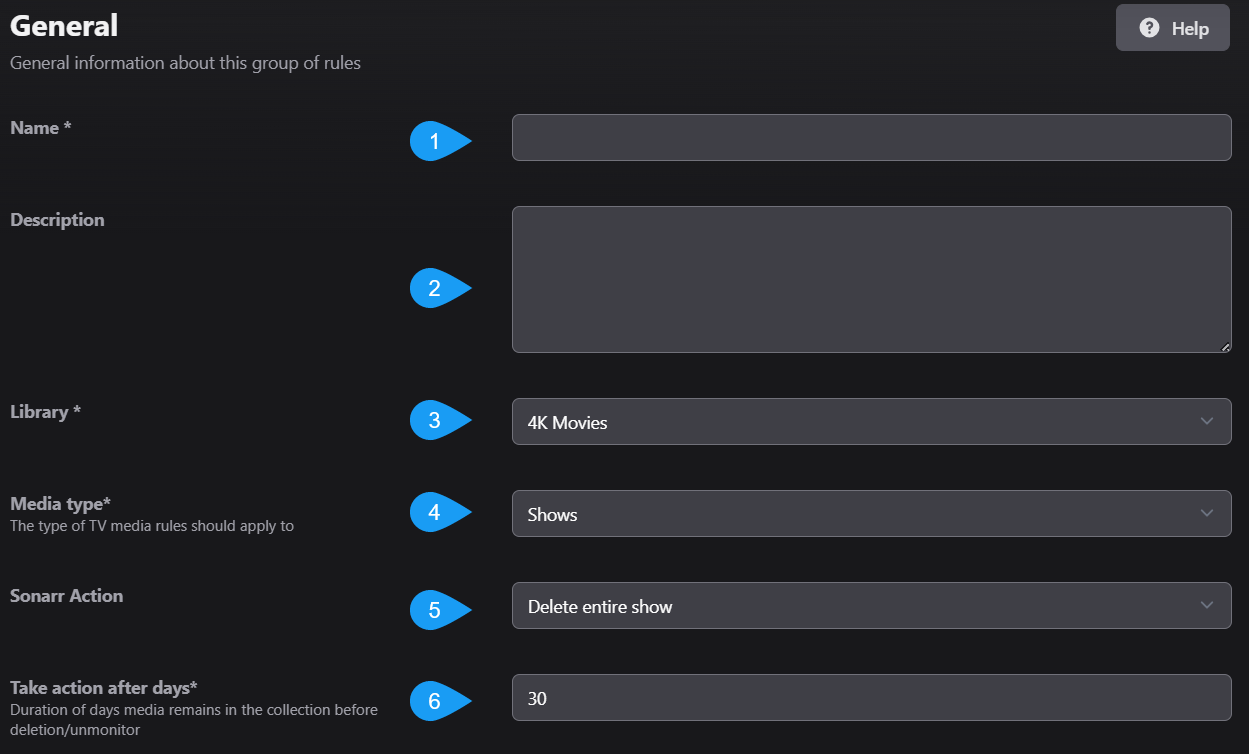
<p><img decoding="async" loading="lazy" alt="Rule setup screen" src="https://docs.maintainerr.info/assets/images/screenshot-1-b3ec902405e6c65cbf6c03b0c6b93bff.png" width="1249" height="754" class="img_ev3q"></p>
<ul>
<li class="">1: This is the name of the Rule, and will eventually be the name of the Collection that gets created.</li>
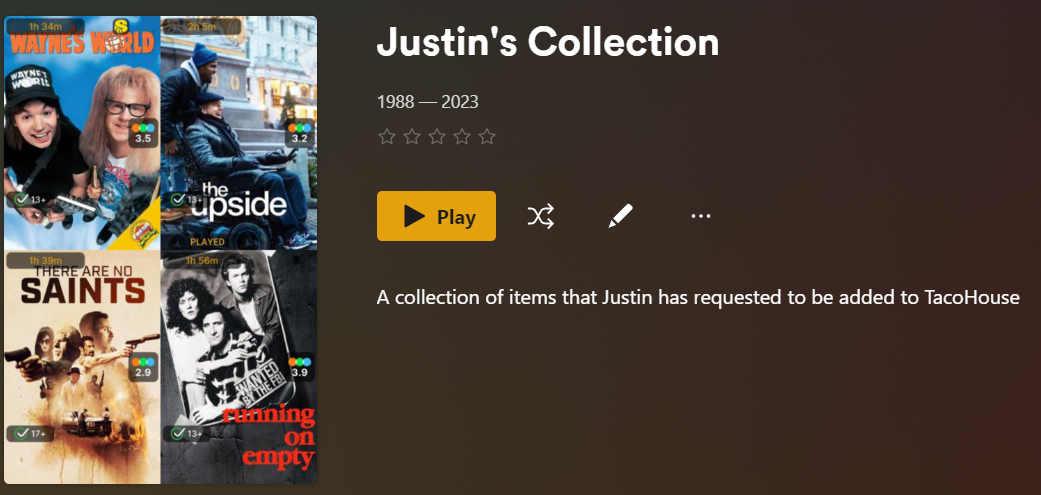
<li class="">2: Self explanatory, but you can put whatever you want here. It will be shown in Plex when you open the collection.</li>
</ul>
<p><img decoding="async" loading="lazy" alt="Plex collection example" src="https://docs.maintainerr.info/assets/images/screenshot_plex_collection-ca08c0c10e25851c45f6c341d3f0688b.png" width="1041" height="495" class="img_ev3q"></p>
<ul>
<li class="">3: Drop-down list of your Plex Libraries. Which library is this rule going to be run against?</li>
<li class="">4: This will not be shown if you select a <code>Movies</code> library in step 3. If you selected a <code>TVShow</code> library, your options will be shows, seasons, or episodes. What type of TV show media are we going to run the rule against? An entire show, just seasons, or just episodes? Different options will be made available to you or taken away, depending on what you select here.</li>
<li class="">5: Sonarr/Radarr action is what is going to happen after the <code>action after days</code> set in step 6. Options are dependent on the library and media type from above. <code>Delete</code> will remove the files and the item from Sonarr/Radarr. <code>Unmonitor and delete</code> will unmonitor, but not remove, the item from Sonarr/Radarr and then delete the files. <code>Unmonitor and keep</code> will unmonitor the item from Sonarr/Radarr and <strong>keep</strong> the files.</li>
<li class="">6: Think of this as a delay setting. How many days after this rule is ran, items have been matched to this rule's filter parameters and added to the collection, will we execute the action set in step 5?</li>
</ul>
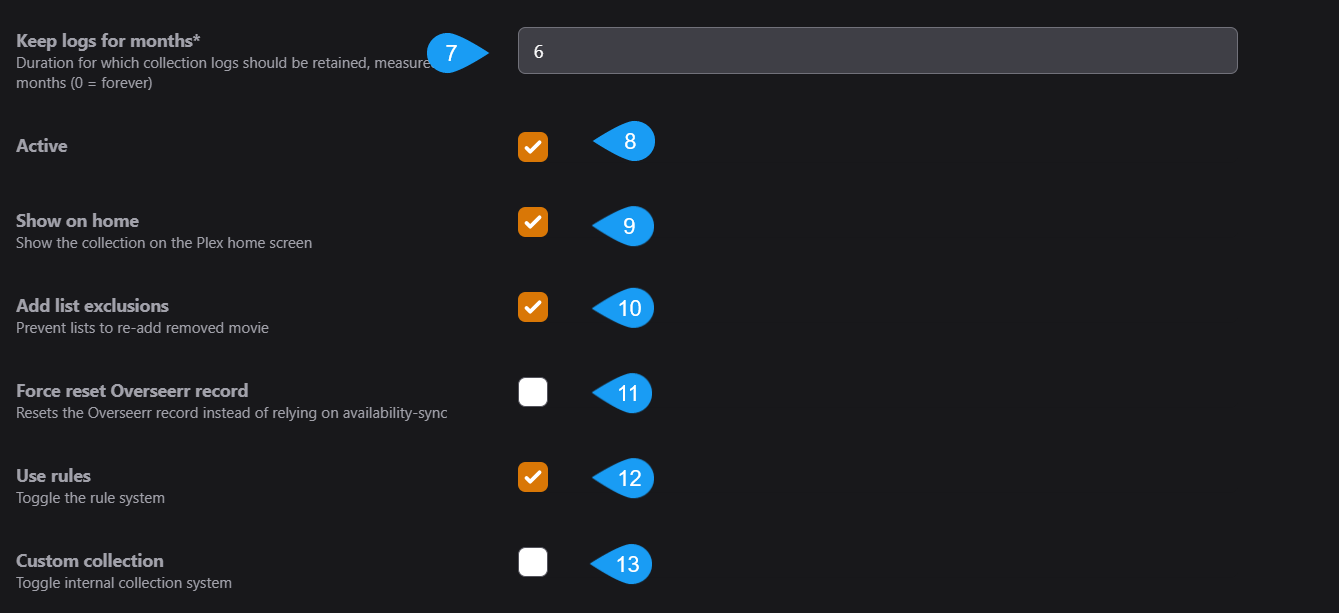
<p><img decoding="async" loading="lazy" alt="Additional rule settings" src="https://docs.maintainerr.info/assets/images/screenshot-2-a6f710433405956bf16415b689dc7266.png" width="1339" height="613" class="img_ev3q"></p>
<ul>
<li class="">7: How many months are we going to keep logs of this collection's actions?</li>
<li class="">8: Is this Rule active? Will it be one of the rules ran either by a manual run, or through periodic runs?</li>
<li class="">9: Is this collection going to be shown on the Plex Home screen, or are you only going to be able to see it through the Plex Library screen?</li>
<li class="">10: When the action set in step 5 is taken, will Maintainerr also send a hit back to Sonarr/Radarr that excludes this item from being automatically added by any import lists?</li>
<li class="">11: It is recommended to keep this option off as it uses an outdated method. Maintainerr now automatically does this.
When the action set in step 5 is taken, will we tell Overseerr that this item is no longer available and can be requested again?</li>
<li class="">12: You can toggle the rule system off and on. This is useful if you have collections in Plex that you want to see in Maintainerr, but don't want any actions taken on the collection.</li>
<li class="">13: You can create a collection in Plex, and then use that collection in Maintainerr. If you are doing that, tick this Custom Collection box to on. This can be useful if there is a collection made by PMM or by you, and you want to execute some rules against it.</li>
</ul>
<p><img decoding="async" loading="lazy" alt="Discord example" src="https://docs.maintainerr.info/assets/images/screenshot_discord_comment-276c8178c0b841c27ebc1ce572d4dec0.png" width="931" height="155" class="img_ev3q"></p>
<hr>
<h2 class="anchor anchorTargetHideOnScrollNavbar_vjPI" id="rule-configuration">Rule Configuration<a href="https://docs.maintainerr.info/blog/getting-started-s01e01/#rule-configuration" class="hash-link" aria-label="Direct link to Rule Configuration" title="Direct link to Rule Configuration" translate="no">​</a></h2>
<p>Now we are getting into the details. After the settings above have been configured to your liking, you start to craft the rule logic. There is a button labeled Community, which contains rule setups that have been shared by others. Clicking on this button will list the uploaded rules, and you can use one of these rules if you wish. Clicking on a rule and then clicking on the info button down below will give you the uploader's description of that rule and possibly how it works.</p>
<div class="theme-admonition theme-admonition-note admonition_xJq3 alert alert--secondary"><div class="admonitionHeading_Gvgb"><span class="admonitionIcon_Rf37"><svg viewBox="0 0 14 16"><path fill-rule="evenodd" d="M6.3 5.69a.942.942 0 0 1-.28-.7c0-.28.09-.52.28-.7.19-.18.42-.28.7-.28.28 0 .52.09.7.28.18.19.28.42.28.7 0 .28-.09.52-.28.7a1 1 0 0 1-.7.3c-.28 0-.52-.11-.7-.3zM8 7.99c-.02-.25-.11-.48-.31-.69-.2-.19-.42-.3-.69-.31H6c-.27.02-.48.13-.69.31-.2.2-.3.44-.31.69h1v3c.02.27.11.5.31.69.2.2.42.31.69.31h1c.27 0 .48-.11.69-.31.2-.19.3-.42.31-.69H8V7.98v.01zM7 2.3c-3.14 0-5.7 2.54-5.7 5.68 0 3.14 2.56 5.7 5.7 5.7s5.7-2.55 5.7-5.7c0-3.15-2.56-5.69-5.7-5.69v.01zM7 .98c3.86 0 7 3.14 7 7s-3.14 7-7 7-7-3.12-7-7 3.14-7 7-7z"></path></svg></span>note</div><div class="admonitionContent_BuS1"><p>Community rules are just that, from the community. They may not work like they say they do. They may not be formatted properly. It can be a nice place to start, but I personally wouldn't rely on them as everyone's situation is different.</p></div></div>
<p>Below the <em>Community</em> button there are two other buttons: Import and Export. You can import a rule from a txt file in YAML format. This is an advanced method, but it is an option.</p>
<div class="theme-admonition theme-admonition-tip admonition_xJq3 alert alert--success"><div class="admonitionHeading_Gvgb"><span class="admonitionIcon_Rf37"><svg viewBox="0 0 12 16"><path fill-rule="evenodd" d="M6.5 0C3.48 0 1 2.19 1 5c0 .92.55 2.25 1 3 1.34 2.25 1.78 2.78 2 4v1h5v-1c.22-1.22.66-1.75 2-4 .45-.75 1-2.08 1-3 0-2.81-2.48-5-5.5-5zm3.64 7.48c-.25.44-.47.8-.67 1.11-.86 1.41-1.25 2.06-1.45 3.23-.02.05-.02.11-.02.17H5c0-.06 0-.13-.02-.17-.2-1.17-.59-1.83-1.45-3.23-.2-.31-.42-.67-.67-1.11C2.44 6.78 2 5.65 2 5c0-2.2 2.02-4 4.5-4 1.22 0 2.36.42 3.22 1.19C10.55 2.94 11 3.94 11 5c0 .66-.44 1.78-.86 2.48zM4 14h5c-.23 1.14-1.3 2-2.5 2s-2.27-.86-2.5-2z"></path></svg></span>tip</div><div class="admonitionContent_BuS1"><p>If you want to go down this path, I would choose one of the Community rules, it doesn't really matter which one, and then use the export button. You will get a generated YAML format of the rule. If you are familiar with YAML this will be a good place to start.</p><p>Take a look at this page for the proper syntax of each parameter: <a class="" href="https://docs.maintainerr.info/glossary/">Rules Glossary</a>.</p></div></div>
<p>If you are looking at a rule that you have already created, you can export the rule in YAML format in order to share it or textually edit it.</p>
<hr>
<h2 class="anchor anchorTargetHideOnScrollNavbar_vjPI" id="rules-and-sections">Rules and Sections<a href="https://docs.maintainerr.info/blog/getting-started-s01e01/#rules-and-sections" class="hash-link" aria-label="Direct link to Rules and Sections" title="Direct link to Rules and Sections" translate="no">​</a></h2>
<p>Understanding rules and sections can be crucial to getting your rule setup properly and achieving your desired outcome.</p>
<p>When you first start, you will be in the first <em>section</em>: Section 1, Rule 1. A section is a grouped set of rules with one output over the whole section, depending on what was matched in the rules within that section.</p>
<h3 class="anchor anchorTargetHideOnScrollNavbar_vjPI" id="and">AND<a href="https://docs.maintainerr.info/blog/getting-started-s01e01/#and" class="hash-link" aria-label="Direct link to AND" title="Direct link to AND" translate="no">​</a></h3>
<p>So let's try an <strong>AND</strong> example.</p>
<ul>
<li class="">Our rule 1 setup gains us output X and output Y.</li>
<li class="">Our rule 2 setup gains us output X.</li>
<li class="">Our rule 2 is set up with an AND operator to rule 1.</li>
<li class="">The output of this section would be X only.
Since X was matched by rule 1 AND rule 2 but Y was only matched by rule 1, it will not be included in the section output because we said we want the output of the <em>section</em> to be everything that matched <strong>(rule 1 AND rule 2)</strong>.</li>
</ul>
<h3 class="anchor anchorTargetHideOnScrollNavbar_vjPI" id="or">OR<a href="https://docs.maintainerr.info/blog/getting-started-s01e01/#or" class="hash-link" aria-label="Direct link to OR" title="Direct link to OR" translate="no">​</a></h3>
<p>Now an <strong>OR</strong> example.</p>
<ul>
<li class="">Our rule 1 setup gains us output X and output Y.</li>
<li class="">Our rule 2 setup gains us output X and output Z.</li>
<li class="">Our rule 2 is set up with an OR operator to rule 1.</li>
<li class="">The output of this section would be X, Y, and Z.
Since X and Y were matched by rule 1, and X and Z were matched by rule 2, they are all included because we said we want the output of the <em>section</em> to be everything that matched <strong>(rule 1 OR rule 2)</strong>.</li>
</ul>
<p>This is probably the simplest form of a rule setup that you can get, unless of course you are only using one rule because anything matched by that one rule becomes the output.</p>
<h3 class="anchor anchorTargetHideOnScrollNavbar_vjPI" id="andor">AND/OR<a href="https://docs.maintainerr.info/blog/getting-started-s01e01/#andor" class="hash-link" aria-label="Direct link to AND/OR" title="Direct link to AND/OR" translate="no">​</a></h3>
<p>Now let's try a mixed <strong>AND</strong> / <strong>OR</strong> example.</p>
<ul>
<li class="">Rule 1 setup gains us output X and output Y.</li>
<li class="">Rule 2 setup gains us output X.</li>
<li class="">Rule 2 is set up with an AND operator to rule 1.</li>
<li class="">The output is X, as before.</li>
<li class="">Rule 3 setup gains us output G and output M.</li>
<li class="">Rule 3 is set up with an OR operator to rule 2.</li>
<li class="">The output of the whole <em>section</em> would be X, G, and M.
Since X was matched by rule 1 AND rule 2 but Y was only matched by rule 1, the output of rule 2 will be only X. Since G and M were matched by rule 3, and we said we want the output of the <em>section</em> to be anything that matches <strong>((rule 1 AND 2) OR rule 3)</strong>, we get X, G, and M.</li>
</ul>
<hr>
<p>This is a very good jumping off point for you to start making rules. If you are still not 100% confident yet, or just want more, take a look at <a class="" href="https://docs.maintainerr.info/blog/rule-creation-s01e02/">S01E02</a> and go even deeper down the rabbit hole.</p>]]></content>
        <author>
            <name>Justin Awtry</name>
            <email>ydkmlt84@maintainerr.info</email>
            <uri>https://github.com/ydkmlt84</uri>
        </author>
    </entry>
    <entry>
        <title type="html"><![CDATA[Rule Creation (S01E02)]]></title>
        <id>https://docs.maintainerr.info/blog/rule-creation-s01e02/</id>
        <link href="https://docs.maintainerr.info/blog/rule-creation-s01e02/"/>
        <updated>2024-03-25T00:00:00.000Z</updated>
        <summary type="html"><![CDATA[Let's go a little further into Rules with some simple examples to get you started.]]></summary>
        <content type="html"><![CDATA[<p><strong>Let's go a little further into Rules with some simple examples to get you started.</strong></p>
<p>In episode 1 we went over a super basic outline of rules and sections, operators, and general rule setup. In today's episode we will go over some simple rule examples. You could set up a few AND rules and roll with it, but then you wouldn't be using Maintainerr to its full potential. This episode should give you a good base of rule knowledge to build off of.</p>
<p>Let's bring back the Movie from episode 1, that we wanted to add into our new collection.</p>
<p><img decoding="async" loading="lazy" alt="Tutorial poster" src="https://docs.maintainerr.info/assets/images/movie_poster-a4eb4ca3a13e8d7f863574dc5947abd7.png" width="768" height="1344" class="img_ev3q"></p>
<p>This movie has the following attributes across Plex, Overseerr, and Radarr:</p>
<p><strong>Plex</strong></p>
<table><thead><tr><th>Added</th><th>Last Viewed</th><th>Times Viewed</th><th>Audience Rating</th></tr></thead><tbody><tr><td>3Nov2023</td><td>10Jan2024</td><td>4</td><td>7.3</td></tr></tbody></table>
<p><strong>Overseerr</strong></p>
<table><thead><tr><th>Requested by</th><th>Requested Date</th><th>Times Requested by Anyone</th></tr></thead><tbody><tr><td>user_girl123</td><td>2Nov2023</td><td>4</td></tr></tbody></table>
<p><strong>Radarr</strong></p>
<table><thead><tr><th>Release Date</th><th>Is Monitored</th><th>Runtime</th></tr></thead><tbody><tr><td>31Oct2023</td><td>True</td><td>114 minutes</td></tr></tbody></table>
<p>With this information, we have quite a few options that we can use as rule parameters and filters.</p>
<h2 class="anchor anchorTargetHideOnScrollNavbar_vjPI" id="simple-rule">Simple Rule<a href="https://docs.maintainerr.info/blog/rule-creation-s01e02/#simple-rule" class="hash-link" aria-label="Direct link to Simple Rule" title="Direct link to Simple Rule" translate="no">​</a></h2>
<ul>
<li class="">1: We can use one rule that states <code>Plex-Date Added</code> <code>before</code> <code>amount of days</code> <code>60</code>.<!-- -->
<ul>
<li class="">This will match in our special tutorial scenario because the day the Movie was added to Plex happened 60 days or more "before" today's date.</li>
</ul>
</li>
<li class="">2: We could use a rule that states <code>Plex-Times Viewed</code> <code>bigger</code> <code>number</code> <code>3</code>.<!-- -->
<ul>
<li class="">This would get added because it has a <em>Times Viewed</em> value of 4, which is bigger than 3.</li>
</ul>
</li>
<li class="">3: We could also use a rule that states <code>Plex-Audience Rating (scale 1-10)</code> <code>bigger</code> <code>number</code> <code>5</code>.<!-- -->
<ul>
<li class="">This rule would catch our movie because its <em>Audience Rating</em> is 7.3, which is bigger than 5.</li>
</ul>
</li>
</ul>
<h2 class="anchor anchorTargetHideOnScrollNavbar_vjPI" id="simple-and">Simple AND<a href="https://docs.maintainerr.info/blog/rule-creation-s01e02/#simple-and" class="hash-link" aria-label="Direct link to Simple AND" title="Direct link to Simple AND" translate="no">​</a></h2>
<ul>
<li class="">1: We could add Rule 1 that states <code>Plex-Date Added</code> <code>before</code> <code>amount of days</code> <code>60</code>. Rule 2 then states AND <code>Plex-Times Viewed</code> <code>bigger</code> <code>number</code> <code>5</code>.<!-- -->
<ul>
<li class="">This would not catch our movie because it has a <em>Times Viewed</em> value of 4 and we need it to match <strong>(rule 1 AND rule 2)</strong>. It does match rule 1 but it does not match rule 2. If another movie in the library was added 60 days ago or more <strong>AND</strong> it had a view count of more than 5, it <strong>would</strong> get added to this rule.</li>
</ul>
</li>
</ul>
<p><strong>Let's try one more.</strong></p>
<ul>
<li class="">2: Rule 1 states <code>Plex-Times Viewed</code> <code>bigger</code> <code>number</code> <code>3</code>. Rule 2 states AND <code>Overseerr-Amount of Requests</code> <code>equals</code> <code>Plex-Times Viewed</code>.<!-- -->
<ul>
<li class="">This rule set <strong>would</strong> add our movie because its <em>Times Viewed</em> amount is 4, which is bigger than 3, <strong>AND</strong> the <em>Amount of Requests</em> from Overseerr equals the <em>Times Viewed</em> amount from Plex: <strong>(Rule 1 AND Rule 2)</strong>.</li>
</ul>
</li>
</ul>
<p>Those are some fairly simple AND examples, and hopefully it is starting to become obvious what is going on. Within a <em>section</em>, and only using AND operators, each item also needs to match the rule before it to be counted as a match and added to the collection.</p>
<p>Another way to look at these examples is that within a <em>section</em>, each rule is making a list. The next rule is checking that list to see if anything also has that value, plus the value of its own rule.</p>
<h3 class="anchor anchorTargetHideOnScrollNavbar_vjPI" id="visual-example">Visual Example<a href="https://docs.maintainerr.info/blog/rule-creation-s01e02/#visual-example" class="hash-link" aria-label="Direct link to Visual Example" title="Direct link to Visual Example" translate="no">​</a></h3>
<div class="language-mermaid codeBlockContainer_Ckt0 theme-code-block" style="--prism-color:#bfc7d5;--prism-background-color:#292d3e"><div class="codeBlockContent_QJqH"><pre tabindex="0" class="prism-code language-mermaid codeBlock_bY9V thin-scrollbar" style="color:#bfc7d5;background-color:#292d3e"><code class="codeBlockLines_e6Vv"><span class="token-line" style="color:#bfc7d5"><span class="token plain">graph LR</span><br></span><span class="token-line" style="color:#bfc7d5"><span class="token plain">title:&gt;Rule-set: Rule1 AND Rule2]</span><br></span><span class="token-line" style="color:#bfc7d5"><span class="token plain">   A([Has it been viewed in Plex more than 3 times?]) --&gt;|Yes|B([AND is it monitored in Radarr?])</span><br></span><span class="token-line" style="color:#bfc7d5"><span class="token plain">   B --&gt;|Yes| C([Add it to the collection])</span><br></span><span class="token-line" style="color:#bfc7d5"><span class="token plain">   B --&gt;|No| D([Don't add to the collection.])</span><br></span></code></pre></div></div>
<h2 class="anchor anchorTargetHideOnScrollNavbar_vjPI" id="simple-or">Simple OR<a href="https://docs.maintainerr.info/blog/rule-creation-s01e02/#simple-or" class="hash-link" aria-label="Direct link to Simple OR" title="Direct link to Simple OR" translate="no">​</a></h2>
<p>We don't have to go too far in depth with this because of what we have already learned. We will just give a quick example, then a visual.</p>
<ul>
<li class="">1: We can use one rule that states <code>Plex-Date Added</code> <code>before</code> <code>amount of days</code> <code>90</code>.<!-- -->
<ul>
<li class="">This will not match in our special tutorial scenario because the day the Movie was added to Plex happened only <em>60</em> days before today's date. Not quite <em>90</em> days yet.</li>
</ul>
</li>
<li class="">2: Our next rule states OR <code>Overseerr-Requested by user (Plex or local username)</code> <code>Contains (Partial list match)</code> <code>text</code> <code>user_girl123</code>.<!-- -->
<ul>
<li class="">This would match because, as we can see, that is who requested the movie.</li>
</ul>
</li>
<li class="">3: This rule set <strong>would</strong> add our movie because it meets one <strong>OR</strong> the other of our criteria. It was added <em>60</em> days ago so it does not meet our criteria of <em>before 90 days</em>, but it did match the Overseerr requested-by-user rule. It gets added because we said we wanted <strong>(Rule 1 OR Rule 2)</strong>.</li>
</ul>
<p>Now let's get a visual.</p>
<h3 class="anchor anchorTargetHideOnScrollNavbar_vjPI" id="visual-example-1">Visual Example<a href="https://docs.maintainerr.info/blog/rule-creation-s01e02/#visual-example-1" class="hash-link" aria-label="Direct link to Visual Example" title="Direct link to Visual Example" translate="no">​</a></h3>
<div class="language-mermaid codeBlockContainer_Ckt0 theme-code-block" style="--prism-color:#bfc7d5;--prism-background-color:#292d3e"><div class="codeBlockContent_QJqH"><pre tabindex="0" class="prism-code language-mermaid codeBlock_bY9V thin-scrollbar" style="color:#bfc7d5;background-color:#292d3e"><code class="codeBlockLines_e6Vv"><span class="token-line" style="color:#bfc7d5"><span class="token plain">graph LR</span><br></span><span class="token-line" style="color:#bfc7d5"><span class="token plain">title:&gt;Rule-set: Rule1 OR Rule2]</span><br></span><span class="token-line" style="color:#bfc7d5"><span class="token plain">A([Was it added to Plex before 90 days?]) --&gt;|No|B([Did it match one OR the other]);</span><br></span><span class="token-line" style="color:#bfc7d5"><span class="token plain">C([Was it requested by user_girl123]) --&gt;|Yes|B;</span><br></span><span class="token-line" style="color:#bfc7d5"><span class="token plain">B --&gt;|Yes|D([Add it to the collection]);</span><br></span></code></pre></div></div>
<p>Again, I hope this is starting to come together. In our next episode we will go over the use of sections and when they can be useful. Stay tuned.</p>]]></content>
        <author>
            <name>Justin Awtry</name>
            <email>ydkmlt84@maintainerr.info</email>
            <uri>https://github.com/ydkmlt84</uri>
        </author>
    </entry>
    <entry>
        <title type="html"><![CDATA[Sections (S01E03)]]></title>
        <id>https://docs.maintainerr.info/blog/sections-s01e03/</id>
        <link href="https://docs.maintainerr.info/blog/sections-s01e03/"/>
        <updated>2024-05-10T00:00:00.000Z</updated>
        <summary type="html"><![CDATA[Why do we even have sections?]]></summary>
        <content type="html"><![CDATA[<p><strong>Why do we even have sections?</strong></p>
<p>It has been said that another word for sections could be <code>group</code>. The reason behind a section is to group a section of rules together. We need a way to group a few rules together that we don't want to be part of the main rule set.</p>
<h2 class="anchor anchorTargetHideOnScrollNavbar_vjPI" id="example-1">Example 1<a href="https://docs.maintainerr.info/blog/sections-s01e03/#example-1" class="hash-link" aria-label="Direct link to Example 1" title="Direct link to Example 1" translate="no">​</a></h2>
<p>This is especially helpful when we need an OR to be ran without it affecting the rest of our rule. In the below example, an item would be included even if it didn't match our other rules if we ran them all in one section.</p>
<div class="language-mermaid codeBlockContainer_Ckt0 theme-code-block" style="--prism-color:#bfc7d5;--prism-background-color:#292d3e"><div class="codeBlockContent_QJqH"><pre tabindex="0" class="prism-code language-mermaid codeBlock_bY9V thin-scrollbar" style="color:#bfc7d5;background-color:#292d3e"><code class="codeBlockLines_e6Vv"><span class="token-line" style="color:#bfc7d5"><span class="token plain">flowchart LR</span><br></span><span class="token-line" style="color:#bfc7d5"><span class="token plain">subgraph Section1</span><br></span><span class="token-line" style="color:#bfc7d5"><span class="token plain">A(Was it added to Plex before 90 days?)-.AND.-&gt;B(Is it monitored in Radarr?)</span><br></span><span class="token-line" style="color:#bfc7d5"><span class="token plain">B -.OR.-&gt;C(Was it requested by user_girl123?)</span><br></span><span class="token-line" style="color:#bfc7d5"><span class="token plain">end</span><br></span><span class="token-line" style="color:#bfc7d5"><span class="token plain">C --&gt;D(Add it to the collection)</span><br></span></code></pre></div></div>
<p>In this example it would only have to have been requested by <code>user_girl123</code> to have matched our rules and be added to the collection. Because we said we wanted <code>Rule1</code> AND <code>Rule2</code> OR <code>Rule3</code>. If <code>user_girl123</code> requested this item but it was not added to Plex before 90 days, it would have matched anyway and been added to the collection. <strong>In this tutorial episode, that isn't what we want.</strong></p>
<h2 class="anchor anchorTargetHideOnScrollNavbar_vjPI" id="example-2">Example 2<a href="https://docs.maintainerr.info/blog/sections-s01e03/#example-2" class="hash-link" aria-label="Direct link to Example 2" title="Direct link to Example 2" translate="no">​</a></h2>
<p>Now let's see what would happen in a section example.</p>
<div class="language-mermaid codeBlockContainer_Ckt0 theme-code-block" style="--prism-color:#bfc7d5;--prism-background-color:#292d3e"><div class="codeBlockContent_QJqH"><pre tabindex="0" class="prism-code language-mermaid codeBlock_bY9V thin-scrollbar" style="color:#bfc7d5;background-color:#292d3e"><code class="codeBlockLines_e6Vv"><span class="token-line" style="color:#bfc7d5"><span class="token plain">flowchart</span><br></span><span class="token-line" style="color:#bfc7d5"><span class="token plain">subgraph Section1</span><br></span><span class="token-line" style="color:#bfc7d5"><span class="token plain">A(Was it added to Plex before 90 days?)-.AND.-&gt;B(Is it monitored in Radarr?)</span><br></span><span class="token-line" style="color:#bfc7d5"><span class="token plain">end</span><br></span><span class="token-line" style="color:#bfc7d5"><span class="token plain">B --&gt;C(Section 1 Results)</span><br></span><span class="token-line" style="color:#bfc7d5"><span class="token plain">subgraph Section2</span><br></span><span class="token-line" style="color:#bfc7d5"><span class="token plain">D(Was it requested by user_girl123?) -.OR.-&gt;E(Has it been watched more than 2 times?)</span><br></span><span class="token-line" style="color:#bfc7d5"><span class="token plain">end</span><br></span><span class="token-line" style="color:#bfc7d5"><span class="token plain">E --&gt;F(Section2 Results)</span><br></span><span class="token-line" style="color:#bfc7d5"><span class="token plain">C --&gt;G(Section1 AND Section2)</span><br></span><span class="token-line" style="color:#bfc7d5"><span class="token plain">F --&gt;G</span><br></span><span class="token-line" style="color:#bfc7d5"><span class="token plain">G ==&gt;H(Add to the collection)</span><br></span></code></pre></div></div>
<p>In this example we added another rule to the mix. This Section 1 setup would catch items that were <code>added to Plex before 90 days</code> AND <code>monitored in Radarr</code>, regardless of if they were <code>requested by user_girl123</code> or <code>watched more than 2 times</code>. The Section 2 setup would catch items that were <code>requested by user_girl123</code> OR <code>watched more than 2 times</code>.</p>
<p>In order for something to match the overall rule set, it would have to meet our Section 1 results AND our Section 2 results. It would need to have been <code>added to Plex before 90 days</code> AND <code>monitored in Radarr</code> AND <code>watched more than 2 times</code>. Or, it would have to have been <code>added to Plex before 90 days</code> AND <code>monitored in Radarr</code> AND <code>requested by user_girl123</code>.</p>
<h2 class="anchor anchorTargetHideOnScrollNavbar_vjPI" id="example-3">Example 3<a href="https://docs.maintainerr.info/blog/sections-s01e03/#example-3" class="hash-link" aria-label="Direct link to Example 3" title="Direct link to Example 3" translate="no">​</a></h2>
<p>Maintainerr runs the rules in a section in order from Rule 1 to Rule X. So when you are making your rules, keep that in mind. This can be useful in a large library where your first rule could potentially match a lot of items. It is advisable to put this rule at the end of the section. One example could be a rule that is like this:</p>
<p><strong>Don't do:</strong></p>
<div class="language-mermaid codeBlockContainer_Ckt0 theme-code-block" style="--prism-color:#bfc7d5;--prism-background-color:#292d3e"><div class="codeBlockContent_QJqH"><pre tabindex="0" class="prism-code language-mermaid codeBlock_bY9V thin-scrollbar" style="color:#bfc7d5;background-color:#292d3e"><code class="codeBlockLines_e6Vv"><span class="token-line" style="color:#bfc7d5"><span class="token plain">flowchart LR</span><br></span><span class="token-line" style="color:#bfc7d5"><span class="token plain">A(Does it have zero views?)--AND--&gt;B(Is it older than 3 years?)</span><br></span><span class="token-line" style="color:#bfc7d5"><span class="token plain">B --AND--&gt;C(Does it not include the Radarr tag *save* ?)</span><br></span></code></pre></div></div>
<p>This example is going to have a lot of results for the <code>zero views</code> rule, potentially 4k out of a 6k and above movie library. It would be better in this instance to put the <code>zero views</code> criteria at the end. Due to the way Maintainerr runs the rules in order, its list from rule 1 could be everything that is <code>older than 3 years</code>, potentially only 2k out of the 6k plus movies, then we only have to sift through those 2k items to find the ones that have <code>zero views</code>. It could be even further reduced if, say, 300 of those have the <code>save</code> tag. We shaved off 2k movies that need to be checked for <code>zero views</code>. These numbers are made up, but this could possibly be the difference of a few hours in a rule execution, or worst case the rule crashes before completion.</p>
<p><strong>Do:</strong></p>
<div class="language-mermaid codeBlockContainer_Ckt0 theme-code-block" style="--prism-color:#bfc7d5;--prism-background-color:#292d3e"><div class="codeBlockContent_QJqH"><pre tabindex="0" class="prism-code language-mermaid codeBlock_bY9V thin-scrollbar" style="color:#bfc7d5;background-color:#292d3e"><code class="codeBlockLines_e6Vv"><span class="token-line" style="color:#bfc7d5"><span class="token plain">flowchart LR</span><br></span><span class="token-line" style="color:#bfc7d5"><span class="token plain">A(Is it older than 3 years?)--AND--&gt;B(Does it not include the Radarr tag *save* ?)</span><br></span><span class="token-line" style="color:#bfc7d5"><span class="token plain">B --AND--&gt;C(Does it have zero views?)</span><br></span></code></pre></div></div>
<h2 class="anchor anchorTargetHideOnScrollNavbar_vjPI" id="example-4">Example 4<a href="https://docs.maintainerr.info/blog/sections-s01e03/#example-4" class="hash-link" aria-label="Direct link to Example 4" title="Direct link to Example 4" translate="no">​</a></h2>
<p>This will be our last example and scenario for sections.</p>
<div class="language-mermaid codeBlockContainer_Ckt0 theme-code-block" style="--prism-color:#bfc7d5;--prism-background-color:#292d3e"><div class="codeBlockContent_QJqH"><pre tabindex="0" class="prism-code language-mermaid codeBlock_bY9V thin-scrollbar" style="color:#bfc7d5;background-color:#292d3e"><code class="codeBlockLines_e6Vv"><span class="token-line" style="color:#bfc7d5"><span class="token plain">flowchart LR</span><br></span><span class="token-line" style="color:#bfc7d5"><span class="token plain">subgraph Section1</span><br></span><span class="token-line" style="color:#bfc7d5"><span class="token plain">A(Was it added to Plex before 90 days?)</span><br></span><span class="token-line" style="color:#bfc7d5"><span class="token plain">end</span><br></span><span class="token-line" style="color:#bfc7d5"><span class="token plain">subgraph Section2</span><br></span><span class="token-line" style="color:#bfc7d5"><span class="token plain">B(Is it monitored in Radarr?)</span><br></span><span class="token-line" style="color:#bfc7d5"><span class="token plain">end</span><br></span><span class="token-line" style="color:#bfc7d5"><span class="token plain">subgraph Section3</span><br></span><span class="token-line" style="color:#bfc7d5"><span class="token plain">C(Was it requested by user_girl123?)</span><br></span><span class="token-line" style="color:#bfc7d5"><span class="token plain">end</span><br></span><span class="token-line" style="color:#bfc7d5"><span class="token plain">A-.AND.-&gt;B</span><br></span><span class="token-line" style="color:#bfc7d5"><span class="token plain">B-.AND.-&gt;C</span><br></span><span class="token-line" style="color:#bfc7d5"><span class="token plain">C ==&gt; D(Results)</span><br></span></code></pre></div></div>
<p>This is the same thing as putting all of those rules in one section: <code>Section 1 results</code> AND <code>Section 2 results</code> AND <code>Section 3 results</code>. There is no need to do this and you should keep them all in one section: <em>(Section 1: Rule 1 AND Rule 2 AND Rule 3)</em>.</p>
<h2 class="anchor anchorTargetHideOnScrollNavbar_vjPI" id="closing">Closing<a href="https://docs.maintainerr.info/blog/sections-s01e03/#closing" class="hash-link" aria-label="Direct link to Closing" title="Direct link to Closing" translate="no">​</a></h2>
<p>Hopefully you learned a little something today. If not, I will try harder next time.</p>
<ul>
<li class="">One more thing I would like to add is how an <code>OR</code> works when compared to an <code>AND</code>. Again, Maintainerr runs rules in order and makes a list. When <code>Rule 1</code> gets looked at, a list is created. When Rule 2 is an <code>AND</code> to Rule 1, Rule 2 criteria gets matched only to items in the Rule 1 list. If Rule 2 was an <code>OR</code> to Rule 1, the entire library gets looked at again during Rule 2 to see if anything matches its criteria. This list gets added to the Rule 1 list.</li>
</ul>
<p>Please send me an email at <a href="mailto:ydkmlt84@maintainerr.info" target="_blank" rel="noopener noreferrer" class="">ydkmlt84@maintainerr.info</a> for suggestions on what to cover in the next episode.</p>]]></content>
        <author>
            <name>Justin Awtry</name>
            <email>ydkmlt84@maintainerr.info</email>
            <uri>https://github.com/ydkmlt84</uri>
        </author>
    </entry>
</feed>